
(832) 766-5410
(281) 656-2666
(832) 290-3120
All Scales USA · Cypress, TX · Industrial scales & Houston calibration

Scale Cables & Connectors
Choose scale cables by the job they perform and the exact ports they connect. This category includes floor-scale homerun cables, balance USB interfaces, serial converters and junction boxes. Check connector type, pin assignment, cable length and communication method so the replacement carries the right signal between your scale, indicator, computer or printer.




Identify both ends of the connection
A homerun cable carries load-cell signals between a weighing platform or junction box and its indicator. A data cable connects an instrument's communication port to a computer, printer or other device. Record both equipment models and connector details. Pin count, connector shell and wire color alone do not establish compatibility; use the manufacturer's pin assignment for the exact instrument.
Replace a floor-scale homerun
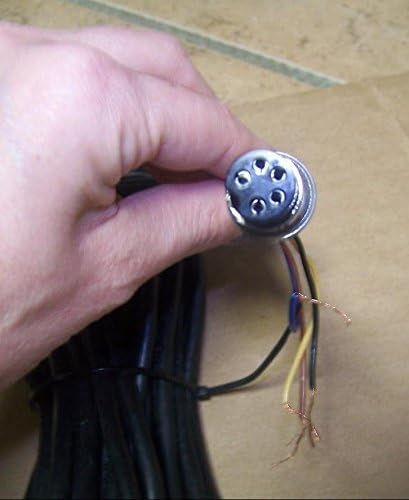
The Brecknell SBI-505 15 ft cable has a five-pin indicator connector and a bare-wire junction-box end. Brecknell's SBI-505 manual identifies AWT05-505848 as its optional load-cell interface cable and shows a separate DB9 RS-232 communication port. Keep those two connections distinct when ordering.
Check the needed routing length and both terminations before replacing damaged wiring. Have trained personnel make electrical connections with power removed, following the indicator manual. If the fault involves the sensing element or display, compare load cells and the related equipment under parts, cells and indicators.
Choose one-way USB output or serial communication
The A&D EJ-02 interface two-pack sends numerical weight values from a compatible EJ balance to a computer. It is a one-way interface, so it cannot receive computer commands. The listing contains two boards; USB cables are separate. Check the balance's available communications slot before adding an interface.
The A&D FXi-02 Quick USB interface includes a cable and provides one-way weight output for compatible FX-i / FZ-i balances. A&D specifies that FXi-02, FXi-08 Ethernet and FXi-09 battery options cannot be used together. If software must send commands back to the balance, check the supported RS-232 path and converter instead of assuming any USB accessory provides two-way control.
Match the Sartorius port generation
The Sartorius YCC01-USBM2 connects a supported 25-pin RS-232 instrument interface to USB; first-generation Entris documentation lists this cable. The Sartorius YCC-USB-C-B has USB Type-C and Type-B connectors. Select from the exact balance and receiving-device documentation rather than the brand name alone.
For printer connections, also check the required serial settings and data format, then choose printers and matching paper. Call (832) 766-5410 with both device models and clear connector photos if the connection is uncertain.